 国外主机测评 - 国外VPS,国外服务器,国外云服务器,测评及优惠码


Java IO教程 – Java异步I/O
在同步文件I/O中,对I/O操作的请求将等待,直到I/O操作完成。
在异步文件I/O中,I/O操作的请求由系统异步执行。
当系统完成文件I/O时,它通知应用程序其请求的完成。
java.nio.channels.AsynchronousFileChannel类表示异步文件通道。
AsynchronousFileChannel类的静态open()方法获取AsynchronousFileChannel类的实例。
以下代码显示了如何获取WRITE的异步文件通道。
Path  path   = Paths.get("C:\\Java_Dev\\rainbow.txt");
AsynchronousFileChannel afc   = AsynchronousFileChannel.open(path, WRITE,  CREATE);
AsynchronousFileChannel提供了两种方法来处理异步文件I/O操作的结果。
- Using a java.util.concurrent.Future object.
- Using a java.nio.channels.CompletionHandler object.
支持异步文件I/O操作的AsynchronousFileChannel类的每个方法有两个版本。
一个版本返回一个Future对象,我们可以使用它来处理所请求的异步操作的结果。
Future对象的get()方法返回写入文件通道的字节数。
以下代码使用返回Future对象的write()方法的版本:
ByteBuffer dataBuffer  = a buffer;
long  startPosition = 0;
Future<Integer> result = afc.write(dataBuffer, startPosition);
一旦我们得到一个Future对象,我们可以使用轮询方法或阻塞等待方法来处理异步文件I/O的结果。
下面的代码显示了轮询方法,它将继续调用Future对象的isDone()方法,以检查I/O操作是否完成:
while (!result.isDone()) {
}
int writtenNumberOfBytes = result.get();
AsynchronousFileChannel类的另一个版本的方法获得一个CompletionHandler对象,当请求的异步I/O操作完成或失败时,该对象的方法被调用。
CompletionHandler接口有两个方法:completed()和failed()。
当所请求的I/O操作成功完成时,将调用completed()方法。
当请求的I/O操作时失败,则调用failed()方法。
以下代码使用Attachment类的对象作为完成处理程序的附件:
class  Attachment {
    public Path  path;
    public  ByteBuffer buffer;
    public  AsynchronousFileChannel asyncChannel;
}
class MyHandler implements CompletionHandler<Integer,  Attachment>   {
    @Override
    public void  completed(Integer result, Attachment attach)  {
        // Handle  completion of  the   I/O  operation
    }

    @Override
    public void  failed(Throwable e,  Attachment attach)  {
        // Handle  failure of  the   I/O  operation
    }
}
以下代码使用MyHandler实例作为异步写操作的完成处理程序。
MyHandler handler = new MyHandler();
ByteBuffer dataBuffer  = get   a  data buffer;
Attachment attach  = new Attachment();
attach.asyncChannel = afc;
attach.buffer = dataBuffer;
attach.path = path;

// Perform  the   asynchronous write operation
afc.write(dataBuffer, 0, attach, handler);
以下代码演示了如何使用CompletionHandler对象来处理对文件的异步写入的结果。
import static java.nio.file.StandardOpenOption.CREATE;
import static java.nio.file.StandardOpenOption.WRITE;

import java.io.IOException;
import java.nio.ByteBuffer;
import java.nio.channels.AsynchronousFileChannel;
import java.nio.channels.CompletionHandler;
import java.nio.charset.Charset;
import java.nio.file.Path;
import java.nio.file.Paths;
public class Main {
  public static void main(String[] args) throws Exception {
    Path path = Paths.get("test.txt");
    AsynchronousFileChannel afc = AsynchronousFileChannel.open(path, WRITE,
        CREATE);
    WriteHandler handler = new WriteHandler();
    ByteBuffer dataBuffer = getDataBuffer();
    Attachment attach = new Attachment();
    attach.asyncChannel = afc;
    attach.buffer = dataBuffer;
    attach.path = path;

    afc.write(dataBuffer, 0, attach, handler);

    System.out.println("Sleeping for 5  seconds...");
    Thread.sleep(5000);
  }
  public static ByteBuffer getDataBuffer() {
    String lineSeparator = System.getProperty("line.separator");
    StringBuilder sb = new StringBuilder();
    sb.append("test");
    sb.append(lineSeparator);
    sb.append("test");
    sb.append(lineSeparator);
    String str = sb.toString();
    Charset cs = Charset.forName("UTF-8");
    ByteBuffer bb = ByteBuffer.wrap(str.getBytes(cs));
    return bb;
  }
}
class Attachment {
  public Path path;
  public ByteBuffer buffer;
  public AsynchronousFileChannel asyncChannel;
}

class WriteHandler implements CompletionHandler<Integer, Attachment> {
  @Override
  public void completed(Integer result, Attachment attach) {
    System.out.format("%s bytes written  to  %s%n", result,
        attach.path.toAbsolutePath());
    try {
       attach.asyncChannel.close();
    } catch (IOException e) {
      e.printStackTrace();
    }
  }

  @Override
  public void failed(Throwable e, Attachment attach) {
    try {
      attach.asyncChannel.close();
    } catch (IOException e1) {
      e1.printStackTrace();
    }
  }
}
例子
以下代码演示了如何使用Future对象来处理对文件的异步写入的结果。
import static java.nio.file.StandardOpenOption.CREATE;
import static java.nio.file.StandardOpenOption.WRITE;

import java.io.IOException;
import java.nio.ByteBuffer;
import java.nio.channels.AsynchronousFileChannel;
import java.nio.charset.Charset;
import java.nio.file.Path;
import java.nio.file.Paths;
import java.util.concurrent.Future;

public class Main {
  public static ByteBuffer getDataBuffer() {
    String lineSeparator = System.getProperty("line.separator");

    StringBuilder sb = new StringBuilder();
    sb.append("test");
    sb.append(lineSeparator);

    String str = sb.toString();
    Charset cs = Charset.forName("UTF-8");
    ByteBuffer bb = ByteBuffer.wrap(str.getBytes(cs));

    return bb;
  }

  public static void main(String[] args) throws Exception {
    Path path = Paths.get("test.txt");

    try (AsynchronousFileChannel afc = AsynchronousFileChannel.open(path,
        WRITE, CREATE)) {
      ByteBuffer dataBuffer = getDataBuffer();
      Future<Integer> result = afc.write(dataBuffer, 0);
      while (!result.isDone()) {
        System.out.println("Sleeping for 2  seconds...");
        Thread.sleep(2000);
      }
      int writtenBytes = result.get();
      System.out.format("%s bytes written  to  %s%n", writtenBytes,
          path.toAbsolutePath());

    } catch (IOException e) {
      e.printStackTrace();
    }
  }
}
上面的代码生成以下结果。

例2
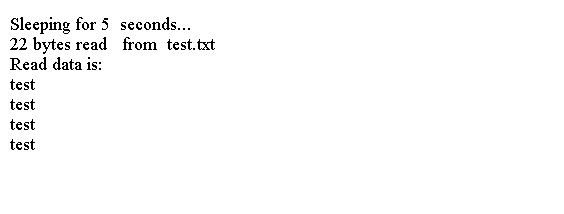
以下代码演示了如何使用CompletionHandler对象来处理从文件进行异步读取的结果。
import static java.nio.file.StandardOpenOption.READ;

import java.io.IOException;
import java.nio.ByteBuffer;
import java.nio.channels.AsynchronousFileChannel;
import java.nio.channels.CompletionHandler;
import java.nio.charset.Charset;
import java.nio.file.Path;
import java.nio.file.Paths;
public class Main {
  public static void main(String[] args) throws Exception{
    Path path = Paths.get("test.txt");
    AsynchronousFileChannel afc = AsynchronousFileChannel.open(path, READ);
    ReadHandler handler = new ReadHandler();
    int fileSize = (int) afc.size();
    ByteBuffer dataBuffer = ByteBuffer.allocate(fileSize);

    Attachment attach = new Attachment();
    attach.asyncChannel = afc;
    attach.buffer = dataBuffer;
    attach.path = path;

    afc.read(dataBuffer, 0, attach, handler);

    System.out.println("Sleeping for 5  seconds...");
    Thread.sleep(5000);
  }
}
class Attachment {
  public Path path;
  public ByteBuffer buffer;
  public AsynchronousFileChannel asyncChannel;
}

class ReadHandler implements CompletionHandler<Integer, Attachment> {
  @Override
  public void completed(Integer result, Attachment attach) {
    System.out.format("%s bytes read   from  %s%n", result, attach.path);
    System.out.format("Read data is:%n");
    byte[] byteData = attach.buffer.array();
    Charset cs = Charset.forName("UTF-8");
    String data = new String(byteData, cs);
    System.out.println(data);
    try {
      // Close the channel
      attach.asyncChannel.close();
    } catch (IOException e) {
      e.printStackTrace();
    }
  }

  @Override
  public void failed(Throwable e, Attachment attach) {
    System.out.format("Read operation  on  %s  file failed."
        + "The  error is: %s%n", attach.path, e.getMessage());
    try {
      // Close the channel
      attach.asyncChannel.close();
    } catch (IOException e1) {
      e1.printStackTrace();
    }
  }
}
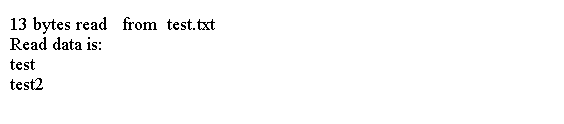
上面的代码生成以下结果。
例3
以下代码显示了如何使用Future对象来处理从文件进行异步读取的结果。它使用等待方法(Future.get()方法调用)等待异步文件I/O完成。
import static java.nio.file.StandardOpenOption.READ;

import java.io.IOException;
import java.nio.ByteBuffer;
import java.nio.channels.AsynchronousFileChannel;
import java.nio.charset.Charset;
import java.nio.file.Path;
import java.nio.file.Paths;
import java.util.concurrent.ExecutionException;
import java.util.concurrent.Future;

public class Main {
  public static void main(String[] args) throws Exception {
    Path path = Paths.get("test.txt");

    try (AsynchronousFileChannel afc = AsynchronousFileChannel.open(path, READ)) {
      int fileSize = (int) afc.size();
      ByteBuffer dataBuffer = ByteBuffer.allocate(fileSize);

      Future<Integer> result = afc.read(dataBuffer, 0);
      int readBytes = result.get();

      System.out.format("%s bytes read   from  %s%n", readBytes, path);
      System.out.format("Read data is:%n");

      byte[] byteData = dataBuffer.array();
      Charset cs = Charset.forName("UTF-8");
      String data = new String(byteData, cs);

      System.out.println(data);
    } catch (IOException ex) {
      ex.printStackTrace();
    }
  }
}
上面的代码生成以下结果。