 国外主机测评 - 国外VPS,国外服务器,国外云服务器,测评及优惠码


JavaFX教程 – JavaFX圆弧
属性:
| 属性 | 意义 | |
|---|---|---|
| centerX | 定义圆弧中心点的 X 坐标。 | |
| centeY | 定义圆弧中心点的 Y 坐标。 | |
| radiusX | 定义整个椭圆的整体宽度(水平半径),其中此弧线是部分截面。 | |
| radiusY | 定义整个椭圆的整体宽度(垂直半径),其中此弧线是部分截面。 | |
| startAngle | 定义圆弧的起始角度(以度为单位)。 | |
| length | 定义圆弧的角度范围(以度为单位)。 | |
| type | 公共最终对象属性 <ArcType> 类型属性 | |
方法:
| 方法 | 意义 | 默认值 |
| setCenterX | 设置属性中心 X 的值。 | 0.0 |
| getCenterX | 获取属性中心 X 的值。
|
0.0 |
| centerXProperty | 定义圆弧中心点的 X 坐标。
|
0.0 |
| setCenterY | 设置属性中心Y的值。
|
0.0 |
| getCenterY | 获取属性中心Y的值。
|
0.0 |
| centerYProperty | 定义圆弧中心点的 Y 坐标。
|
0.0 |
| setRadiusX | 设置属性 radius X 的值。
|
0.0 |
| getRadiusX | 获取属性 radiusX 的值。
|
0.0 |
| radiusXProperty | 定义整个椭圆的整体宽度(水平半径),其中此弧线是部分截面。
|
0.0 |
| setRadiusY | 设置属性半径Y的值。
|
0.0 |
| getRadiusY | 获取属性半径Y的值。
|
0.0 |
| radiusYProperty | 定义整个椭圆的整体高度(垂直半径),其中此弧线是部分截面。
|
0.0 |
| setStartAngle | 设置属性 startAngle 的值。
|
0.0 |
| getStartAngle | 获取属性 startAngle 的值。
|
0.0 |
| startAngleProperty | 定义圆弧的起始角度(以度为单位)。
|
0.0 |
| setLength | 设置属性长度的值。
|
0.0 |
| getLength | 获取属性长度的值。
|
0.0 |
| lengthProperty | 定义圆弧的角度范围(以度为单位)。
|
0.0 |
| setType | 设置属性类型的值。
|
OPEN |
| getType | 获取属性类型的值。
|
OPEN |
| typeProperty | 定义圆弧的闭合类型 | OPEN |
| toString | 返回此对象的字符串表示形式。
|
弧
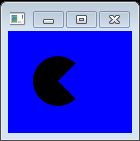
以下代码显示如何绘制以50,50为中心,半径为25并从角度45延伸到角度315(270度长)的圆弧。
import javafx.application.Application;
import javafx.scene.Group;
import javafx.scene.Scene;
import javafx.scene.paint.Color;
import javafx.scene.shape.Arc;
import javafx.scene.shape.ArcType;
import javafx.stage.Stage;

public class Main extends Application {
    public static void main(String[] args) {
        Application.launch(args);
    }
    @Override
    public void start(Stage primaryStage) {
        primaryStage.setTitle("Text Fonts");

        Group g = new Group();
        Scene scene = new Scene(g, 550, 250,Color.web("0x0000FF",1.0));

        Arc arc = new Arc();
        arc.setCenterX(50.0f);
        arc.setCenterY(50.0f);
        arc.setRadiusX(25.0f);
        arc.setRadiusY(25.0f);
        arc.setStartAngle(45.0f);
        arc.setLength(270.0f);
        arc.setType(ArcType.ROUND);

        g.getChildren().add(arc);

        primaryStage.setScene(scene);
        primaryStage.show();
    }
}
上面的代码生成以下结果。
圆
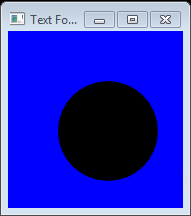
Circle类创建一个新的圆,其中指定的半径和中心位置以像素为单位。
import javafx.application.Application;
import javafx.scene.Group;
import javafx.scene.Scene;
import javafx.scene.paint.Color;
import javafx.scene.shape.Circle;
import javafx.stage.Stage;

public class Main extends Application {
    public static void main(String[] args) {
        Application.launch(args);
    }
    @Override
    public void start(Stage primaryStage) {
        primaryStage.setTitle("Text Fonts");
        Group root = new Group();
        Scene scene = new Scene(root, 550, 250,Color.web("0x0000FF"));

        Circle circle = new Circle();
        circle.setCenterX(100.0f);
        circle.setCenterY(100.0f);
        circle.setRadius(50.0f);

        root.getChildren().add(circle);

        primaryStage.setScene(scene);
        primaryStage.show();
    }
}
上面的代码生成以下结果。
例子
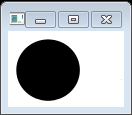
以下代码显示了如何使用Circle构造函数传递半径和中心。
import java.util.List;

import javafx.application.Application;
import javafx.scene.Group;
import javafx.scene.Scene;
import javafx.scene.paint.Color;
import javafx.scene.shape.Circle;
import javafx.stage.Stage;

public class Main extends Application {

    public static void main(String[] args) {
        Application.launch(args);
    }

    @Override
    public void start(Stage primaryStage) {
        primaryStage.setTitle("Title");

        final Circle circ = new Circle(40, 40, 30);
        final Group root = new Group(circ);
        final Scene scene = new Scene(root, 400, 300);

        primaryStage.setScene(scene);
        primaryStage.show();
    }
}
上面的代码生成以下结果。
例2
圆与DropShadow
import javafx.application.Application;
import javafx.scene.Group;
import javafx.scene.Scene;
import javafx.scene.effect.DropShadow;
import javafx.scene.paint.Color;
import javafx.scene.shape.Circle;
import javafx.scene.text.Font;
import javafx.scene.text.FontWeight;
import javafx.scene.text.Text;
import javafx.stage.Stage;

public class Main extends Application {
  public static void main(String[] args) {
    Application.launch(args);
  }

  @Override
  public void start(Stage primaryStage) {
    primaryStage.setTitle("");
    Group root = new Group();
    Scene scene = new Scene(root, 300, 250, Color.WHITE);

    Group g = new Group();

    DropShadow ds1 = new DropShadow();
    ds1.setOffsetY(4.0);

    Circle c = new Circle();
    c.setEffect(ds1);
    c.setCenterX(50.0);
    c.setCenterY(125.0);
    c.setRadius(30.0);
    c.setFill(Color.RED);
    c.setCache(true);

    g.getChildren().add(c);

    root.getChildren().add(g);
    primaryStage.setScene(scene);
    primaryStage.show();
  }
}
getBoundsInParent()方法返回节点的边界区域,例如其宽度和高度。
对于高度和宽度的 getBoundsInParent()计算包括节点的实际尺寸加上任何效果,平移和变换。例如,具有阴影效果的形状通过包括阴影增加其宽度。
上面的代码生成以下结果。